
I came to Chile starting from zero (I’ll write about that someday). I didn’t speak Spanish, so I turned to Chinatown. There I finally understood something I’d heard long ago: products don’t grow on shelves.
After talking with shopkeepers for a while, I began to understand how most stores here work: physical shops that do wholesale and retail at the same time.
Day to day, they count stock, organize it, shelve it, ship it, manage the warehouse and restock. The ones that haven’t yet matured also have to take photos, enter product data, run their online channels and manage customers.
This happens to be what I’m good at. So I partnered with a store whose wholesale business was maturing but which was struggling to open an online wholesale channel, and I started the neo-studio project.
Below I’ll introduce it mainly from the product’s point of view.
S · Situation: a general store’s listing problem
The store sells a bit of everything: cookware, socks, umbrellas, perfume, stationery… Every shipment brings a pile of new products to list, and “listing” here includes online channels.
Listing is tedious in a very specific way:
- Data entry: item code, barcode, name (one in Chinese, one in Spanish), specs and carton quantity, one item at a time.
- Photos: shot casually on the counter, with a messy table behind and unstable light. The pictures can’t be shown to customers as they are.
- Distribution: the same product has to be entered in several places — the WeChat shop (Yougou), the Facebook / Instagram shops, the store’s own website, and the in-store ERP.
- Order picking: staff sometimes can’t find an item from the picking list — the photos on it are tiny and there is no shelf location.
None of these steps is hard, but together a single shipment takes hours. Data is scattered everywhere, and after taking photos you still have to organize it all against the data; changing one price means editing several places.
T · Task: the goals I set
What I wanted wasn’t “a better spreadsheet”, but to connect the entire chain:
- Fast entry: staff scan and shoot with their own phones, several people can enter at once, no dedicated barcode scanner needed.
- Good-looking images: many stores have neither professional photo equipment nor retouchers. So I decided to use AI to turn casual counter photos into professional white-background, multi-angle product images with specs and barcode.
- Enter once, use everywhere: maintain the data in one place and sync it to every sales platform in one click.
- Simple to operate: a short training session should be enough for staff to use it day to day.
- Help with order picking: print barcodes on the picking list; when a photo is unclear, staff can scan to see product info and shelf location and zoom into details. When several people pick together, everyone can see what the others have already found.
There were also two real-world constraints: to earn the owner’s trust, data had to stay local; and the store’s existing ERP has no external API.
A · Action: how I did it
Start with the overall architecture. The diagram below is interactive — click any node to see what it does and which technologies it uses:
主工作台:产品网格、详情抽屉、AI 批量渲染与精调、排版模板编辑、订单与平台同步。任务队列和进度通过 WebSocket 实时推送。
点击节点查看细节 · 节点可以拖动
The whole system is organized around three things: entry, production and distribution.
Entry: the phone is the barcode scanner
The phone side is a standalone React page, which staff open over HTTPS on the store’s local network.
Scanning a barcode fills in the item code automatically, photos upload directly, and the Chinese and Spanish names, specs and carton quantity are all filled in at once. Several people can enter at the same time, and finished products show up on the PC side in real time.
Production: from a casual snapshot to a commercial image
The PC side is called Neo Studio, the main workspace.
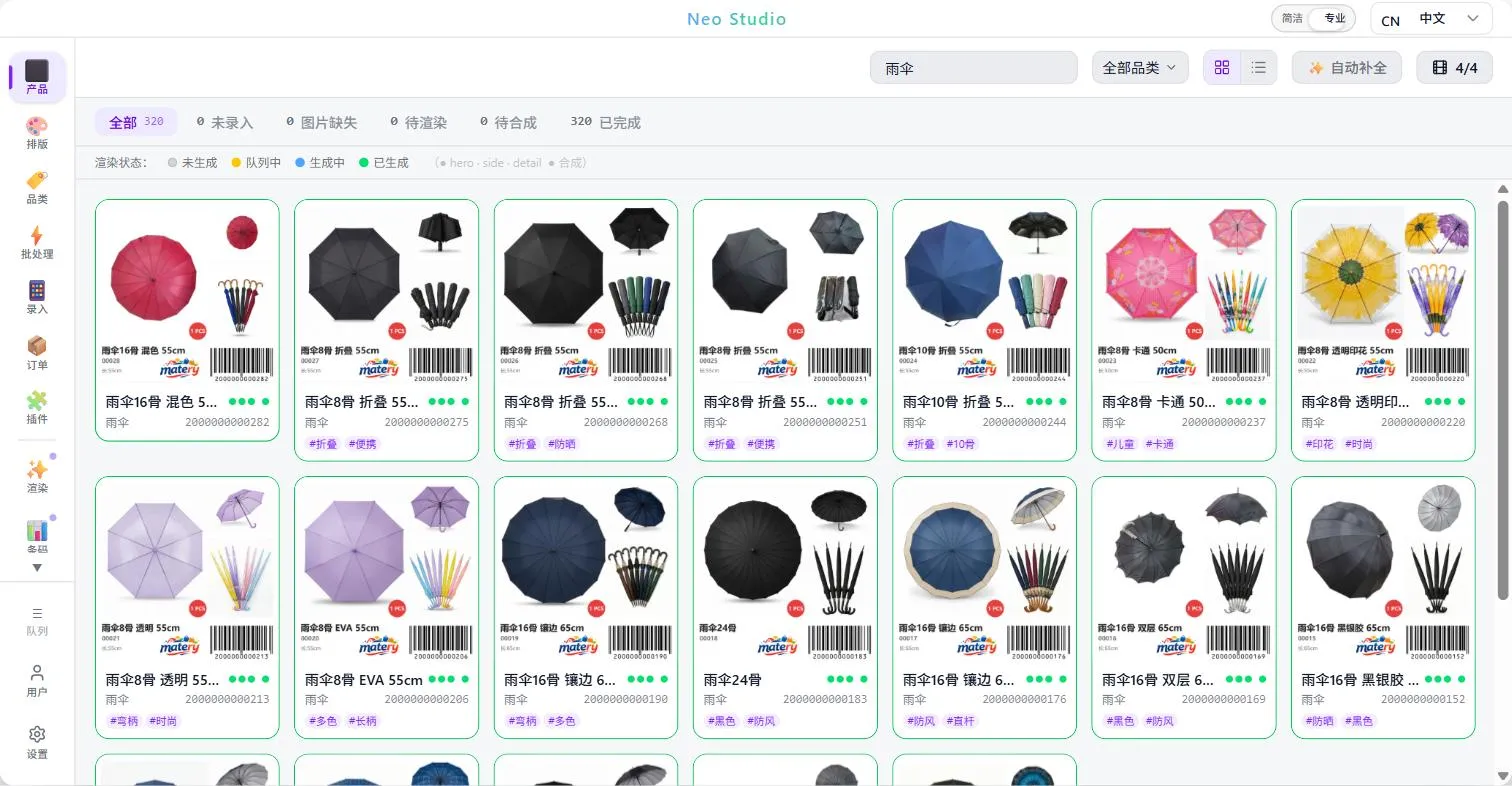
All products are shown as a grid. The three dots under each card show the render status of the hero / side / detail views:
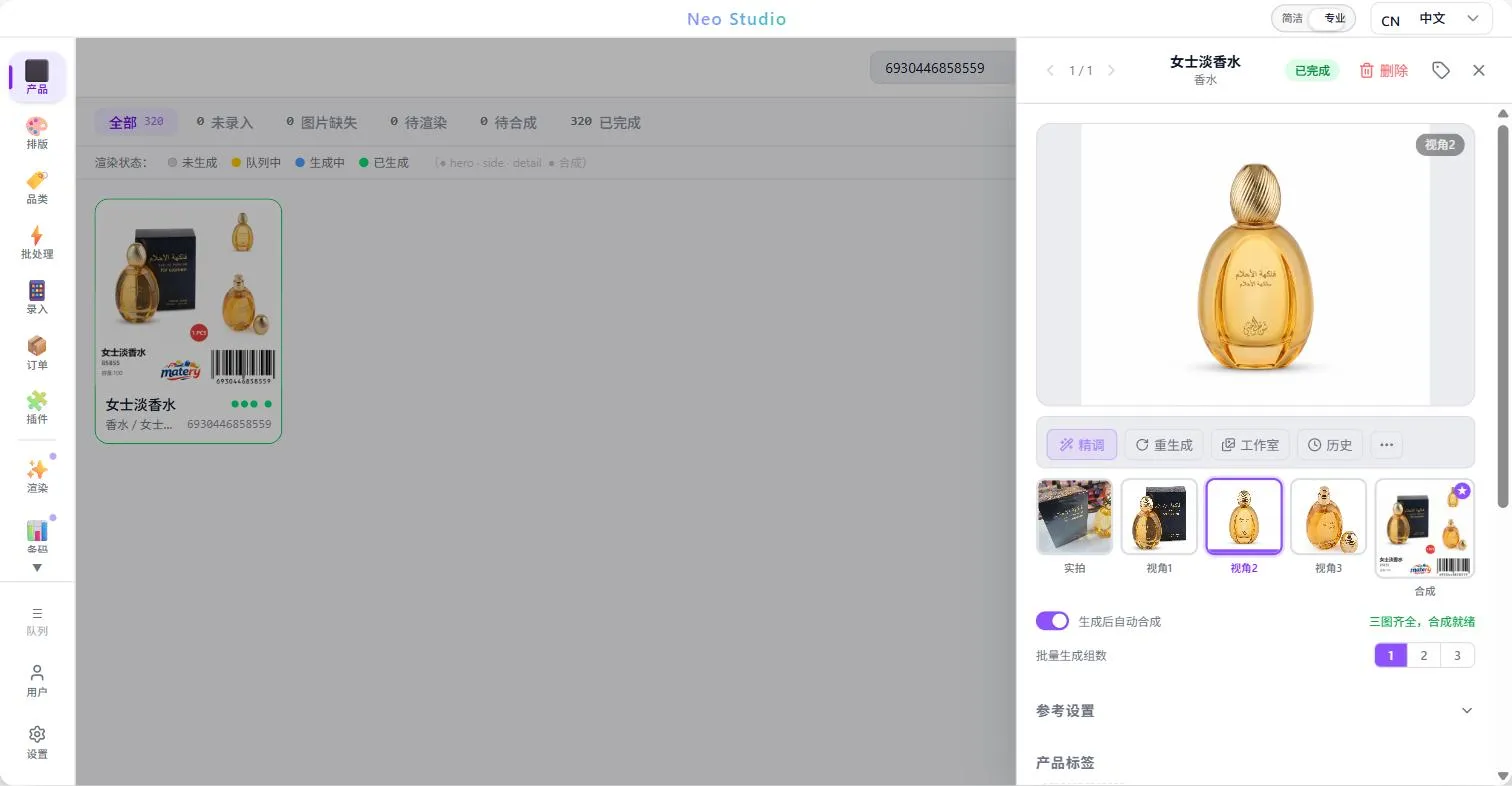
Open a product and you see the original photos, the three AI-generated views and the final composite.
If a view isn’t right, you can regenerate it in one click, or refine it with a text instruction:
Here is a real recording of a “regenerate”: look at the original photo, then regenerate view 2 — a new image comes back in about ten seconds, and the composite updates automatically:
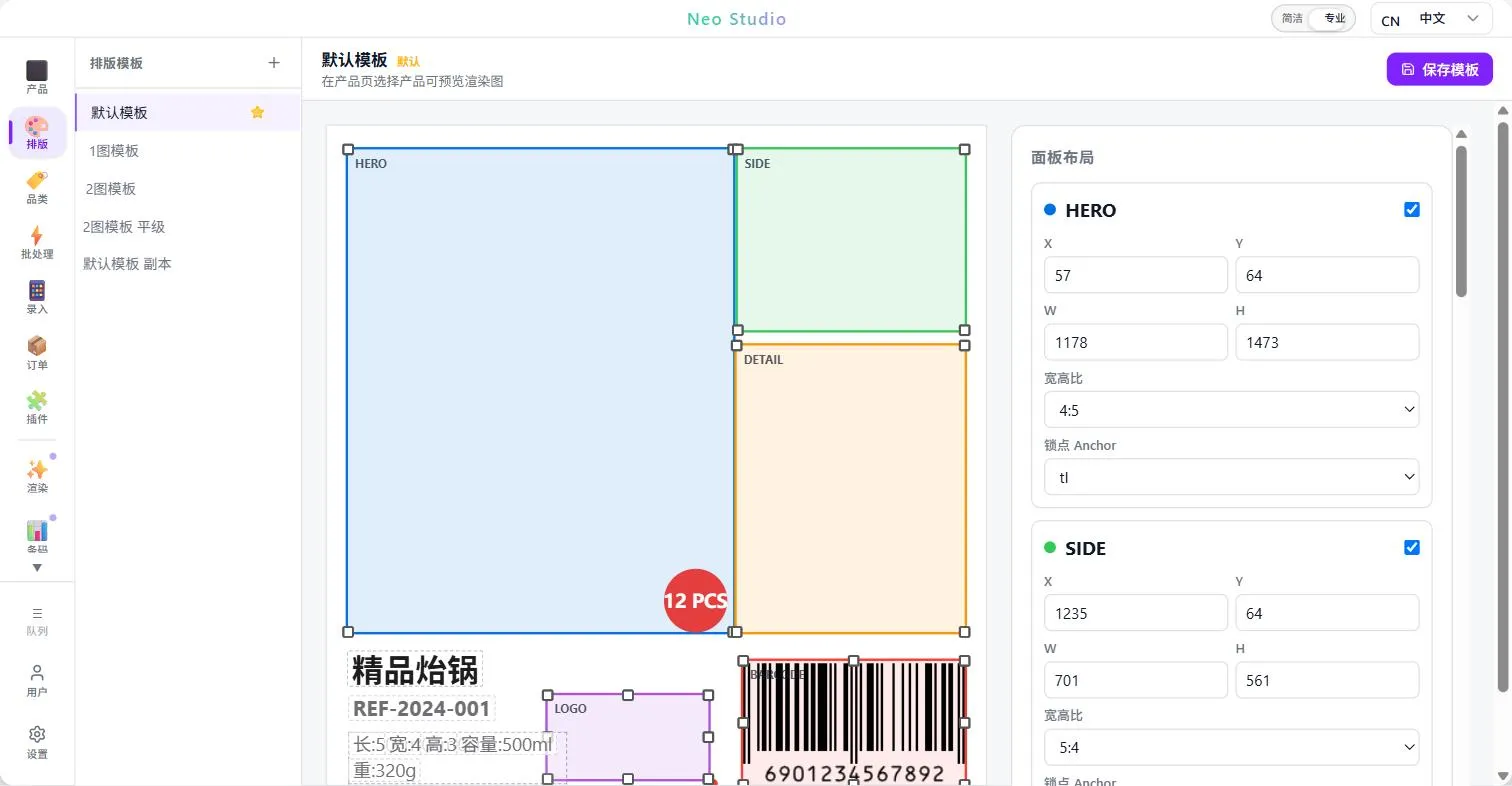
The generated views are finally combined into the finished image according to a layout template. The template defines where each view goes, how the name and specs are laid out, and where the barcode and store logo sit.
The template itself is also edited visually:
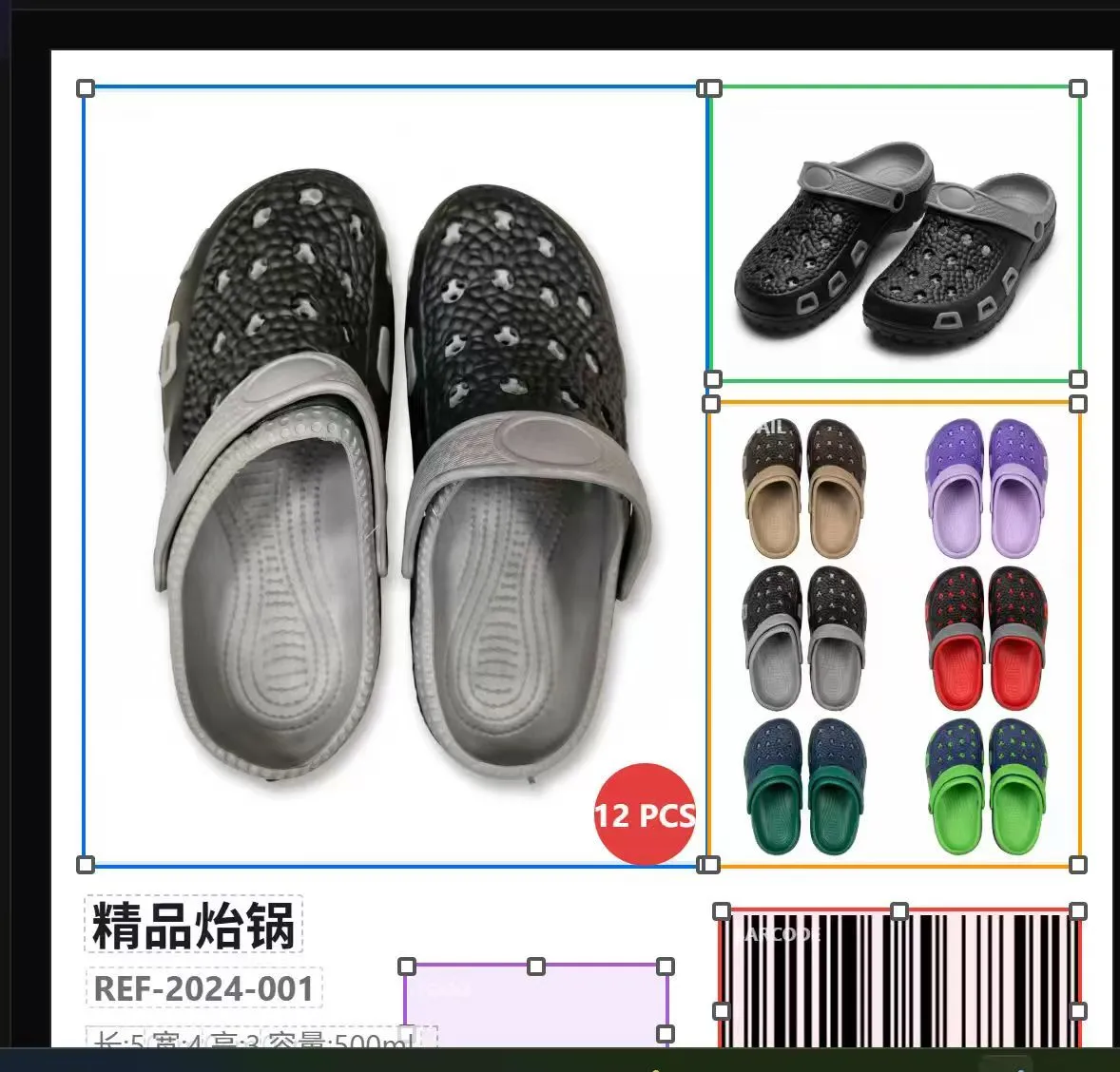
Different categories can use different templates, for example this one with an enlarged main view and the detail shot on the right:
Generation really comes down to two operations: Generate (brand new, no context) and Refine (modify on top of the previous result).
“Regenerate” and “refine” in the UI correspond to these two.
The hard part of refining is “remembering the last time” — if you just send the previous image as an ordinary reference, the model has no idea it is the one it just drew.
When Gemini returns an image it includes a thought signature, which represents the internal state of that turn. Send it back together with the previous conversation, and the model truly knows “this is what I drew last time, and now I’m changing it”, instead of drawing a new one from scratch.
Different categories need different generation prompts (should an umbrella be open or closed, should perfume include its box).
I no longer tune these prompts by trial and error myself. I let AI do it: write the prompt into the database, trigger a render, look at the generated image directly through the Gemini API, judge what’s wrong, rewrite the prompt, go another round, and archive it into the code once it converges.
It’s like letting the AI be its own judge. I call this process laag.
Its benefit isn’t saving time. It’s that, unlike manual tuning, you don’t tune away and forget the pitfalls you hit before.
And the prompts for each category effectively become a valuable data asset — if this ever becomes a SaaS product, that would be a significant data moat.
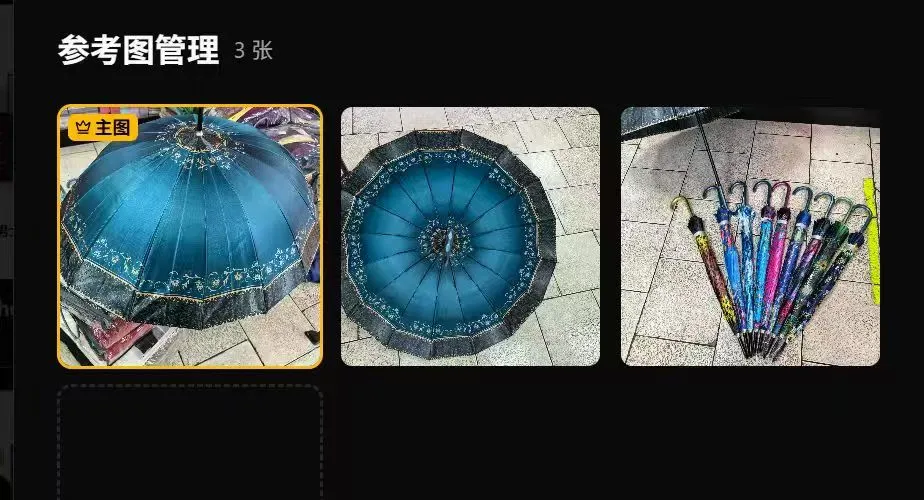
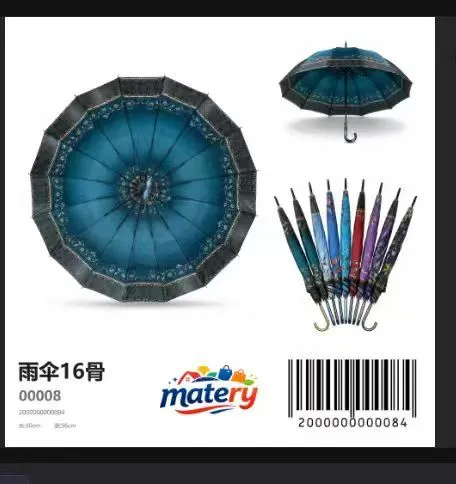
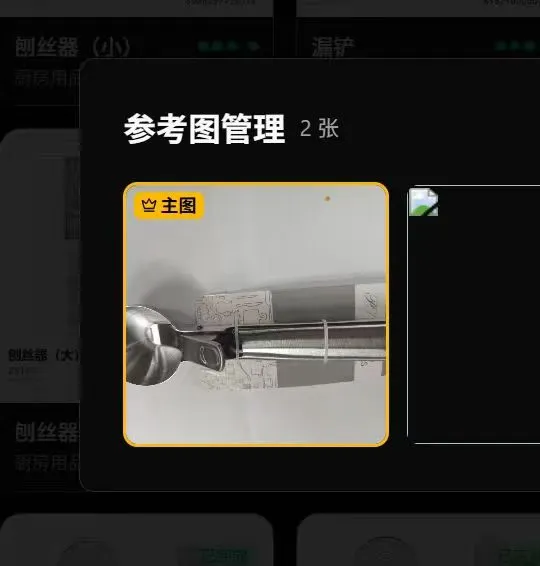
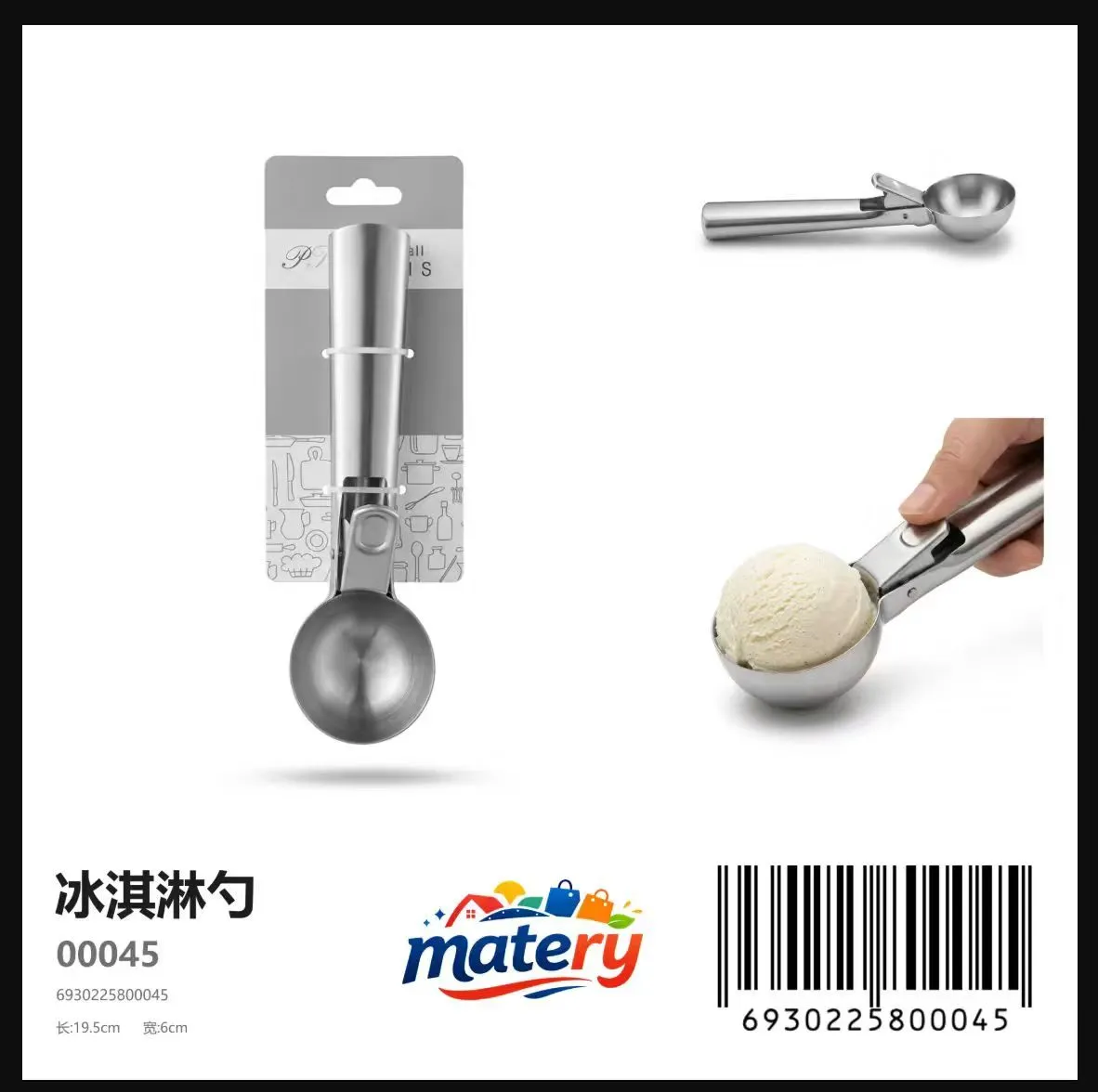
Here are before/after examples for two other categories. On the left is the original photo from the reference-image manager, on the right the automatically composed result (the umbrella gets an open main view plus a closed detail view; the kitchen tool also gets a hand-held usage shot):
Distribution: enter once, sync to many platforms
All data lives in exactly one place — a local SQLite database.
Each external platform has its own integration layer in the backend: one each for Yougou, the Meta product catalog and the store website’s CMS.
Each layer translates local fields into platform fields and records whether the two sides have “drifted”.
The three platforms behave completely differently. Yougou has no open API, so the integration reads and writes its database directly; product codes come from the store’s item codes, which are not guaranteed to be unique, so on a duplicate the product ID is appended as a suffix (for example r00008_61) — otherwise two products would overwrite each other on the Yougou side. A successful response from Meta’s catalog API only means the request was received — review is asynchronous, and whether the item actually shows up in the Facebook / Instagram shop requires pulling the review status separately and writing it back. The store website’s login is a JWT that expires after one hour, and I refresh it proactively at minute 50 rather than waiting for a request to fail.
The store’s ERP has no public interface, so, as the store requested, I connect directly to the business data on the local machine, and I kept manual Excel import as a fallback — when the integration breaks, the business doesn’t stop.
Product dimension labels
This is where entering data in one place pays off: during entry, staff already fill in all the data we need, so nothing has to be collected separately. When labeling, we can pull the already-entered dimensions straight from the UI and quickly annotate the image.
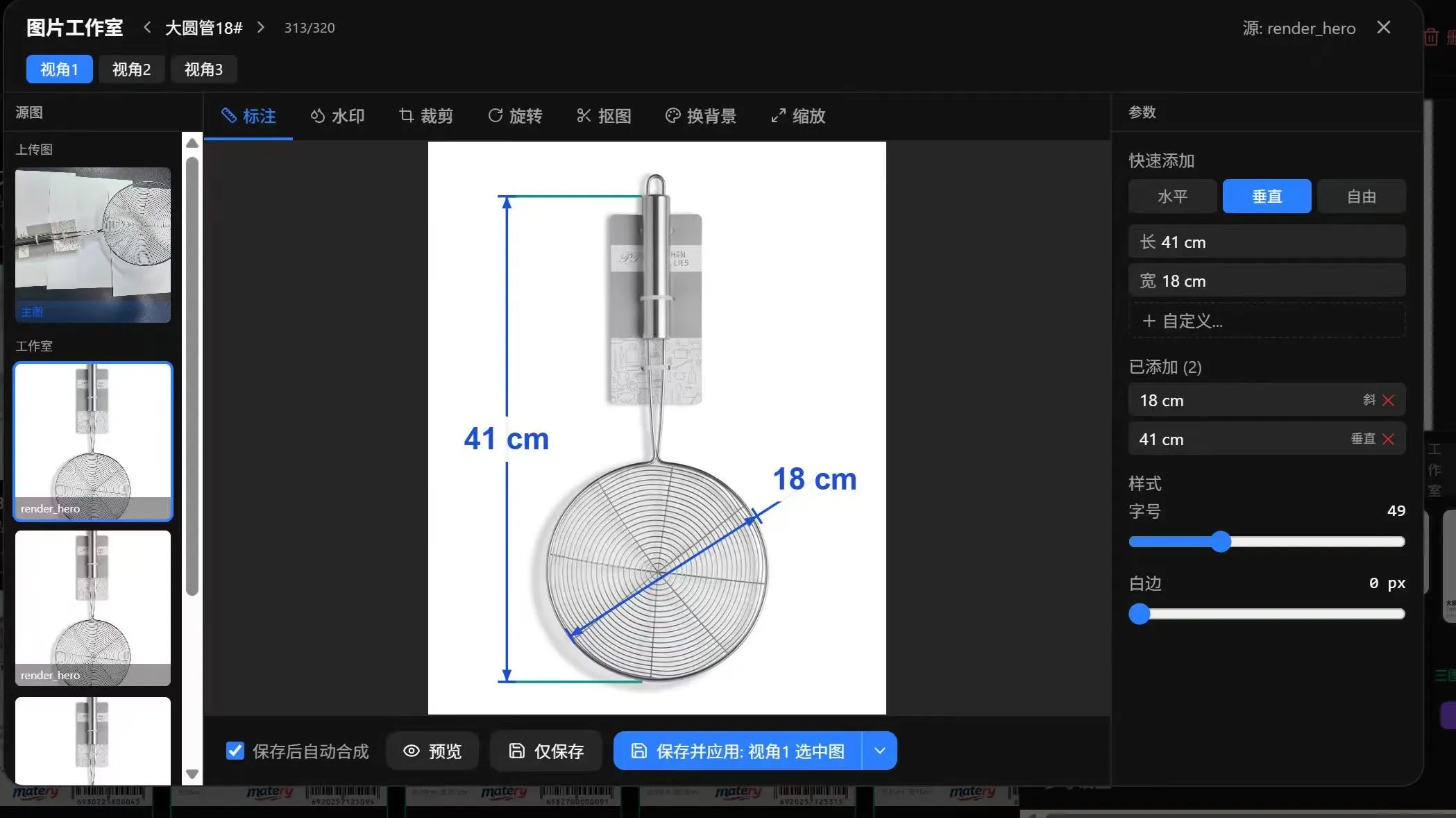
P.S. My first job was as a structural engineer, mostly dimensioning in CAD and Creo, maintaining drawings, and keeping PLM and Excel data in sync. Now that I’ve built such a system myself, I can’t help feeling a little proud (。•̀ᴗ-)✧
Order picking: no more squinting at tiny photos
Wholesale orders are often a long list of “which item, how many cartons”. The old picking list had only lines of text and very small photos, and staff often couldn’t find the goods from it.
Now, once an order is created in the system, it can be printed in one click as a picking list with photos, Chinese and Spanish names, item code, carton quantity and a barcode:
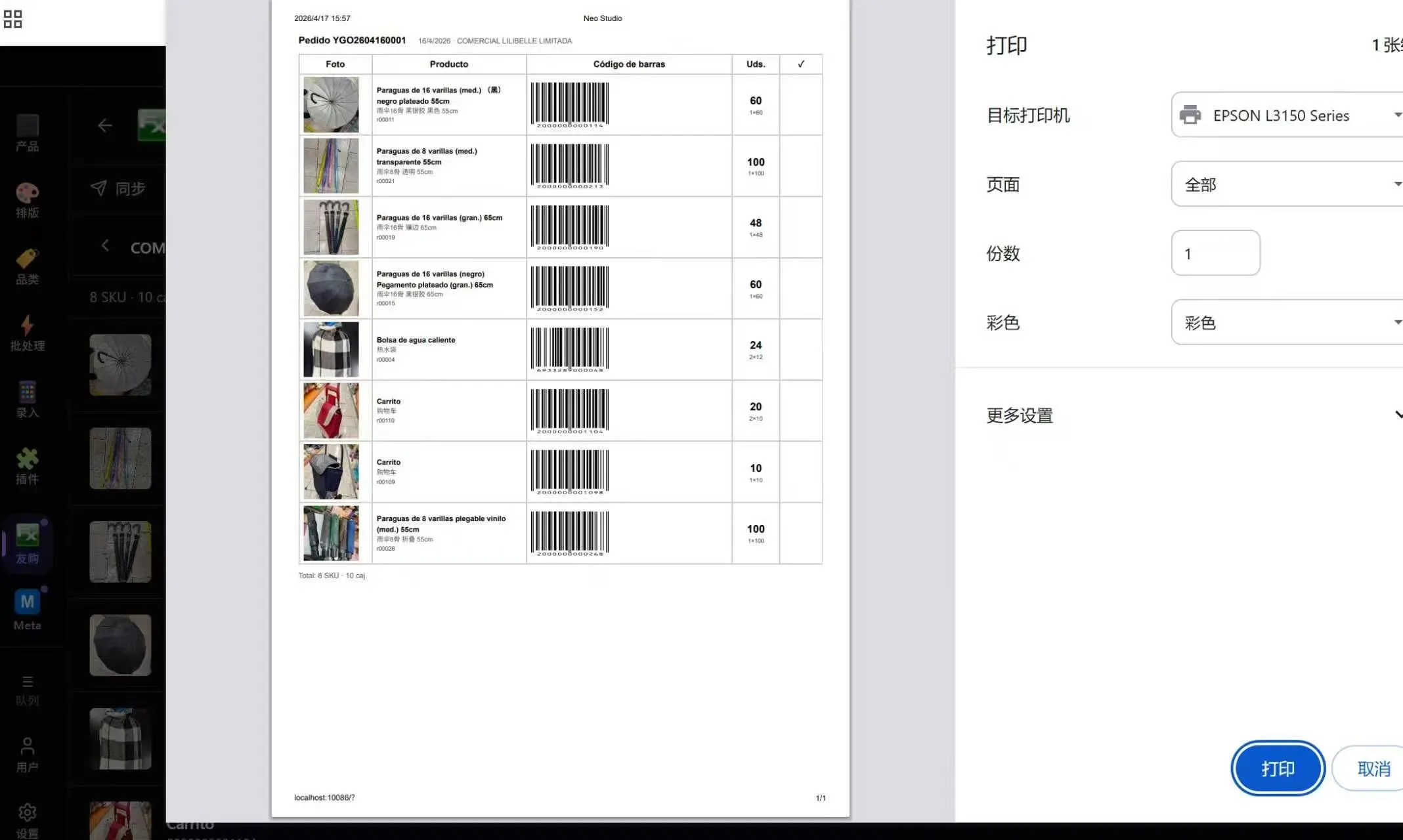
What staff hold in their hands is this sheet: photo on the left, name in the middle, barcode and quantity on the right, and a last column left for ticking:
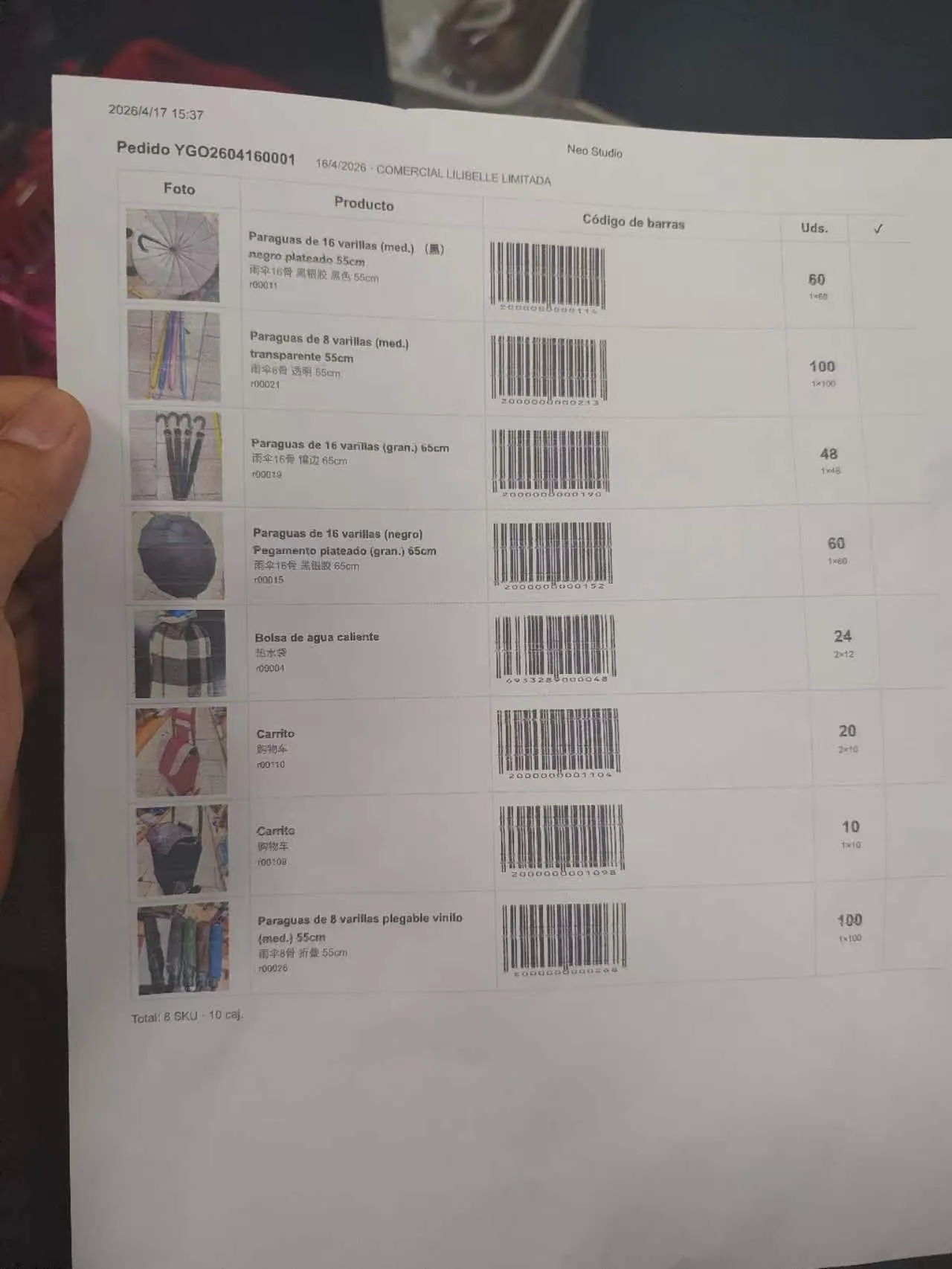
For an item whose photo is unclear, staff take out a phone and scan the barcode to see product info and shelf location, and zoom into the details.
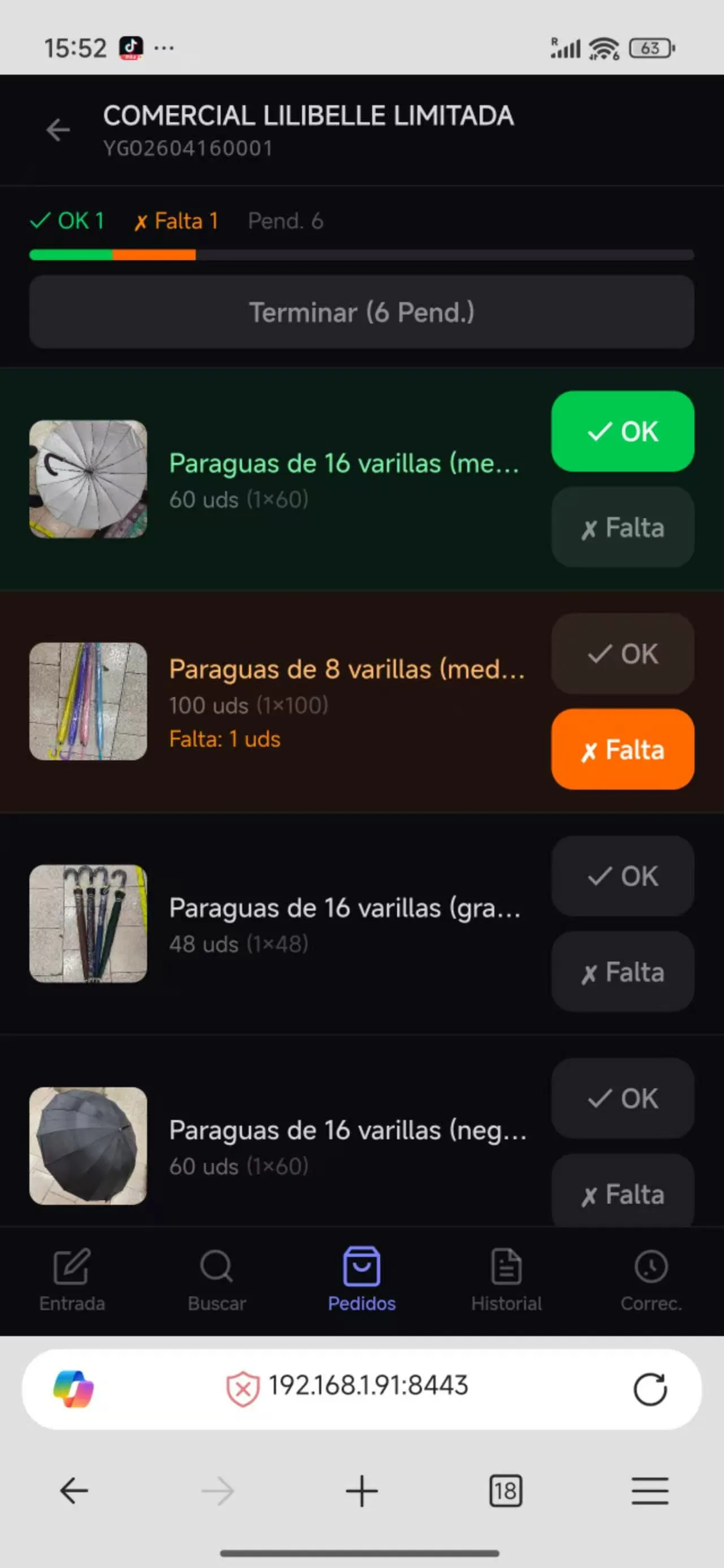
When several people pick the same order, each taps OK or Falta (missing) on their phone and everyone else’s screen updates in sync, so it’s clear who found what and what’s still missing:
Making it run in the store
Finally, Electron packages the whole system into a single exe: double-click it and it starts the local backend, which in turn serves the PC and phone pages.
The store’s computer needs no development environment at all (I’ll write a separate post about the pitfalls of packaging).
I also built an MCP Server that exposes the product library as tools an AI can call — query products, start batch renders, refine a particular view.
For routine maintenance, many things can be handed to an LLM in natural language. But given the customer’s willingness to pay, I haven’t opened this part up to them; for now only I can use it.
R · Result
The most direct result is the images. On the left is a casual photo taken by staff on the counter; on the right the finished image automatically generated and composed by the system — white background, multiple angles, with volume, item code, barcode and the store logo:


- The system is in daily use in the store, helping it quickly set up online sales channels while also managing the offline warehouse and restocking.
- Listing a shipment went from days to minutes.
- Data is maintained once, and syncing to each platform takes one click.
- Order picking no longer relies on guessing from tiny photos; with barcode scanning and multi-person sync, missed and wrong picks dropped noticeably.
- It helped the store build up data assets (a product database and per-category generation templates), lowering the development cost of any future standalone site or data analysis.
- I earned the money I need to survive in Chile (๑•̀ㅂ•́)و✧
Glad I left a way out: the AI model “expired”
One day the store reported that the AI image generation suddenly stopped working — “regenerate” just kept failing. I opened the project and found two problems stacked on top of each other:
- Model name: the project was still using the preview name of a Gemini image model (ending in
-preview). The stable version had since been released and preview names get retired sooner or later, so I switched everything to the stable name and gathered the model name into a single place. - Quota: after switching to a new key, the API returned 429 — the AI Studio free tier has a quota of 0 for image-generation models. In the end I moved the backend to Vertex AI (the simple API-key mode, billed through GCP).
Moving to Vertex also exposed a knock-on problem: the project used to upload product images to Gemini’s File API for a 47-hour cache, and Vertex has no such API. Fortunately the cache had been designed as optional — any cache failure automatically falls back to inlining the images — so I only needed to skip the cache under Vertex, without changing a single line of the rendering logic.
Likewise, if the e-commerce ERP the store uses ever breaks, I can use Excel fallback mode: have them export, through my system, an Excel file in the shape their ERP expects and sync the data that way. I only need to modify that compatibility layer.
Next
This post is written mainly from the product’s point of view and doesn’t go into technical details. The next posts will cover the technology: trade-offs, the database, the task queue, and Electron packaging.